For readers coming from Panels

Moving from Panels to Yomu

Comic files such as CBZ, CBR and PDF are ordinary files, and any app that reads them can open them. Here is how to bring yours into Yomu, and what to expect when you do.

What you get

  • Your files open as they are CBZ, CBR, ZIP, RAR, 7z, TAR, PDF and EPUB files, and folders of images. Nothing to convert first.
  • Bring them in your way Import a file or a folder from the Files app or iCloud Drive, or share a file to Yomu from the Files app. On a Mac, drag files or folders onto the window.
  • Or read a folder where it is Choose a folder in the Files app or iCloud Drive, or connect a shared folder on your network, and Yomu reads the comics where they are, without copying them.
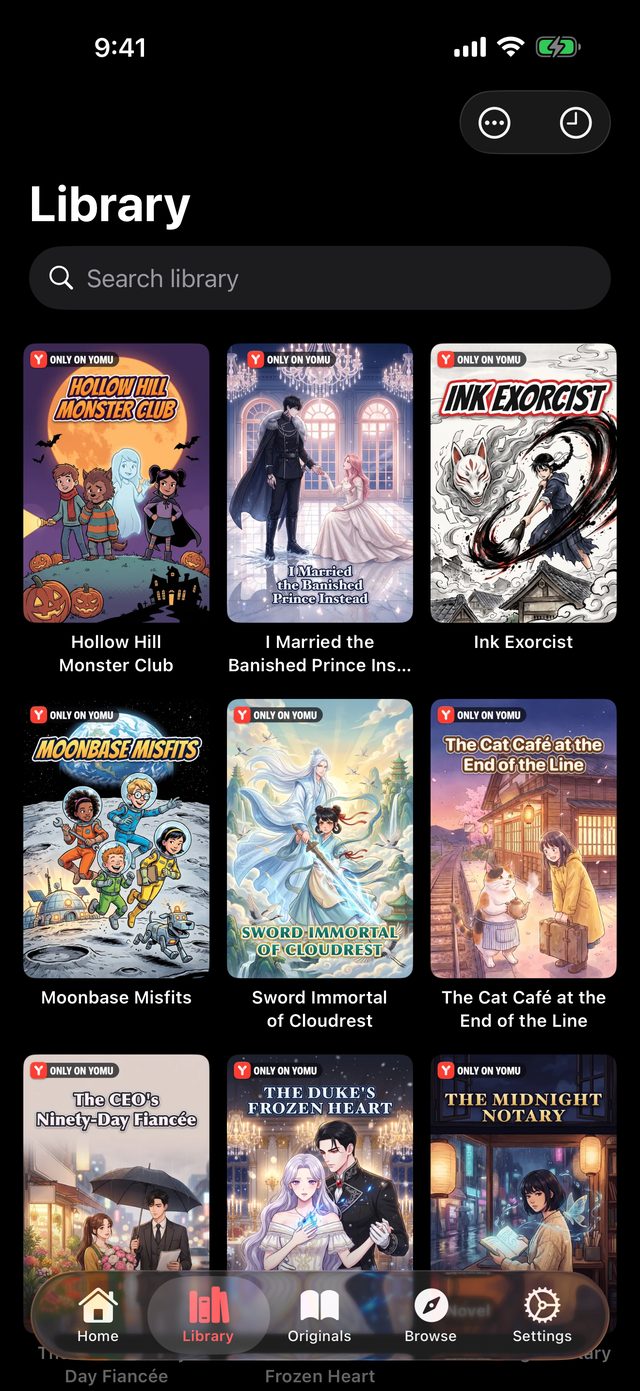
  • A library, not a file list Covers, series and your place in each book. Yomu reads the details stored in your files when they have them.
  • On iPhone, iPad and Mac One app on all three. With Yomu Premium, iCloud Sync keeps your library and your place in step between them.
A manga library in Yomu on iPhone

Bring your comics over

  1. Get Yomu from the App Store on your iPhone, iPad or Mac.
  2. Put the comic files you want to read where you can reach them: the Files app, iCloud Drive or a shared folder on your network.
  3. In Yomu, open Browse, then Local Files, and choose Import File… to pick a file or a folder.
  4. Or, to read a folder where it is, tap + in Browse and choose Add Storage, then Choose Folder…
  5. Tap a cover and read.

Reading your own files is free. Some reader options, some ways to connect, and iCloud Sync are part of Yomu Premium.

FAQ

Frequently asked questions

Can Yomu read the comics I read in Panels?

Yomu reads comic files: CBZ, CBR, PDF, EPUB and the other types above. Any comic you have as such a file can be brought into Yomu with Local Files.

Does my reading progress come over?

No. Yomu keeps its own place in each book, starting from the first page. Reading progress, collections and purchases made in another app stay with that app.

Do I have to delete anything?

No. Importing puts a copy in Yomu, and your original file stays where it was.

Is Yomu free?

Yomu is free to download, and reading your own files is free. Yomu Premium is a subscription that adds iCloud Sync, server connections, translation and more.
Start reading.

Free to download. No account required.